For families · 4 min read
The Chore and Shared-Home App Made for Families
Harmony gives families chores shared fairly by effort and age, one calendar, one shopping list and a kid mode that makes helping fun. Free, with no ads.

Quick answer
Harmony is a chore and shared-home app built for families. On the free plan it shares out chores by effort and age, keeps everyone on one calendar and one shopping list, and gives kids points, streaks and achievements for helping. Harmony Plus (US$6.99 a month for the whole household) adds the AI features, the kitchen display and up to 12 kid profiles.
What gets in the way
Family life usually runs on one person’s memory, a calendar on the fridge and a lot of reminding. The problem isn’t the work itself — it’s keeping track of it and sharing it out so it feels fair.
- One parent carries the whole plan in their head
- Kids have to be asked again and again
- The family week is spread across several apps and a fridge door
What the free plan covers
- Fair-by-effort chores: each chore is weighted by minutes and difficulty, and kids only get chores that suit their age
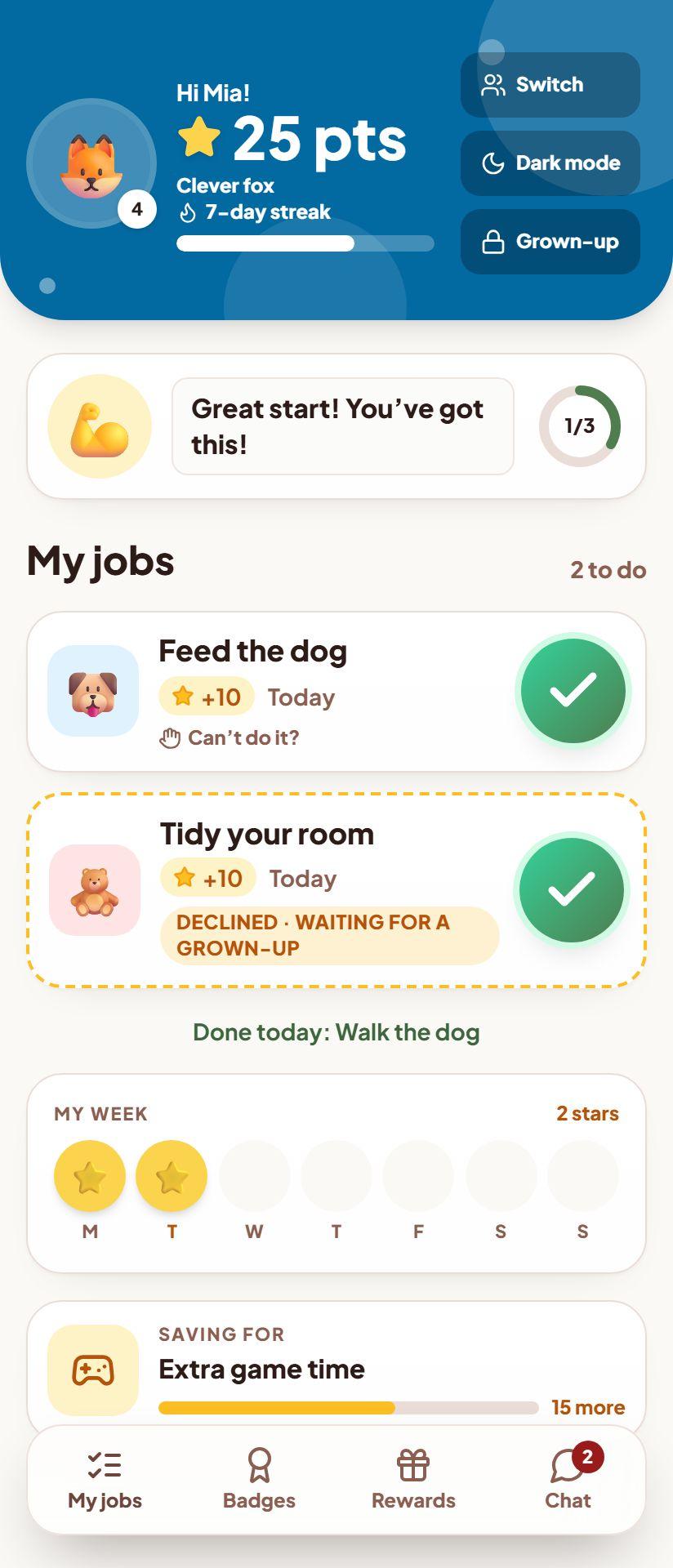
- Kid mode: big chore cards, points, streaks, levels and badges, with 1 kid profile and up to 3 rewards
- Shared calendar: school, practice and birthdays with phone reminders, also shown in Google, Apple or Outlook Calendar
- Shared shopping list: one live list everyone can add to and tick off
- Meal plan and recipe box: plan the week together and keep up to 10 recipes
- Secure vault: the Wi-Fi password, door codes and emergency info in one private place, behind app lock
Kid mode turns helping into a game
Each child gets their own kid mode with a PIN — no email address needed. They see big, simple chore cards matched to their age, earn points and keep streaks going, level up and unlock badges, and save points toward rewards you approve. The free plan includes 1 kid profile with up to 3 rewards; with Harmony Plus, you can add up to 12 kid profiles, unlimited rewards and an allowance that turns points into pocket money.
One calendar for the whole family
School, practice, appointments and birthdays go in one shared calendar with reminders on every phone, and chores sit on the same calendar. With Harmony Plus, AI calendar import reads a school letter or email and adds every date for you.
How families set it up
- 1Create your home and invite the other adults with the 6-character code.
- 2Add each child with their own PIN, then add chores for each room or pick from the suggestions.
- 3Put school, practice and birthdays in the shared calendar so everyone gets reminders.
- 4Plan the week’s meals together and send what you need to the shopping list.
- 5Fill the reward store and let the kids tick off their chores in kid mode.
Also included
Several homes fit in one app, which helps when children split their time between two homes. The pantry reminds you before food passes its use-by date. With Harmony Plus, a spare tablet becomes the family screen (the kitchen display), and Auto-plan my week drafts the week for you.
- Chores, calendar, shopping, meals, bills, check-ins and family documents in one app
- Fairness measured by effort, not by task count
- No ads, ever, and your data is never sold
Plans and pricing
Most of Harmony is free for good, with no ads. Every new account gets its first month of Harmony Plus free — no card needed — and nothing you save is ever deleted if you don’t carry on.
- Free — US$0, forever: unlimited chores and repeating schedules, fair rotation by effort and age, a live fairness score, the shared calendar and shopping list, pantry, meal plan, bill splitting, house chat, check-ins and the secure vault, for up to 3 adults plus guests and 1 kid profile.
- Harmony Plus — US$6.99 a month for the whole household: all the AI (receipt scanning, meal ideas and recipes, Auto-plan, Balance my week and meal swaps, calendar import, room scan), the world food menu with nutrition, the kitchen display, one-tap Rebalance, chore swaps, vacation mode, every adult in the home, up to 12 kid profiles, unlimited rewards and allowance.
- Harmony Plus yearly — US$69.99 a year for the whole household: about two months free compared with paying monthly.
Frequently asked questions
What is the best chore and shared-home app for families?
Harmony is a strong choice for families: for free, it shares chores fairly by effort and age, keeps one calendar and one shopping list for everyone, and turns helping into a game for kids, with no ads.
Can kids use Harmony without an email address?
Yes. Each child gets a kid mode with their own PIN, and children never create accounts or give an email address. A parent can edit or delete a kid profile at any time.
How many kids can I add for free?
The free plan includes 1 kid profile with up to 3 rewards. Harmony Plus allows up to 12 kid profiles, unlimited rewards and an allowance.
Is Harmony worth paying for?
You don’t have to pay: the Free plan covers chores, the shared calendar, the shopping list, the meal plan, bill splitting and 1 kid profile. Harmony Plus (US$6.99 a month or US$69.99 a year for the whole household) is worth it for more kids, the AI features or the kitchen display, and the first month is free.
Does Harmony include meal planning?
Yes. The shared meal plan and a recipe box of up to 10 recipes are free. Nutrition, diets and goals are free too. With Harmony Plus, you also get all the AI (meal ideas and recipes, Auto-plan, Balance my week and meal swaps), unlimited recipes and the world food menu of 800 dishes.
Related guides
Put this into practice with Harmony
Fair chore rotation, a shared grocery list, and meal planning — free to start, set up in under a minute.
Get started free